A new kind of baby tracking — and beyond.
She notices before you ask, and nudges you first for your baby.
An AI assistant for pregnancy and childhood. She remembers the little details about your child, and messages you first when something looks off — not a diagnosis. Free to download on iPhone and Android.


Free to download on iPhone & Android. No card. See plans
Made by parents who've been there. Built for the 3am version of you.



Watch how Susan works
Our Product Hunt launch video.
Why we built Susan
Our son was born on a Saturday.
He wasn't feeding well those first days — and we didn't realize we could have asked the nurses for formula to top him up. Discharged a couple of days later, we were up every night typing his symptoms into ChatGPT at 3 a.m. Good general info — but it had no idea this was our baby, on day three, with a pattern building since Tuesday. The next morning his face looked deeply yellow. We went straight back to emergency — readmitted, this time topping him up with formula. He's fine.
We kept landing on the same thought: we had tools — the tools just didn't know us. Not our baby, not our history, not what day three meant.
Hey Susan™ is the assistant that knows you and your baby — not parenting in the abstract. She keeps track of feeds, diapers and sleep so your patterns are there when you want them, and points you to your pediatrician for anything medical. She also asks how you're doing, because postpartum is real.
— Warren & Joanna, founders
What makes Susan different
Other apps wait for you to open them. Susan learns your baby, can reach out first, guides the whole journey from pregnancy toward 18, and can check in on how you're doing.
Log by text or a one-tap dial
One-tap sleep timer
Dashboard, timeline, calendar and charts
Allergen tracking
A second caregiver, one shared history
A guided journey: pregnancy to 18
A shared plan board & Learning Paths
Emergency help: who to call, fast
Ask in plain language
Nap and feed windows from your baby's own logs.
Sharper memory.
She can reach out first.
Naps and feeds on your Google Calendar.
HeyBeNice! Help finding softer words for your partner.
More chats with Susan each day.
Susan — Power Saver
Susan — Max Performance
Most baby apps are a logbook. Susan™ has a brain — nine faculties, modeled loosely on how memory and attention work in the brain.
- 1
Notices what’s off
She learns your baby's normal, so she notices the moment something's off — a late feed, a skipped nap.
Notices what’s off
She learns your baby's normal, so she notices the moment something's off — a late feed, a skipped nap.
- 2
A picture that keeps building
What she learns about your baby is saved between conversations — then refreshed against your latest logs every time you talk, so the picture keeps building instead of starting from zero.
A picture that keeps building
What she learns about your baby is saved between conversations — then refreshed against your latest logs every time you talk, so the picture keeps building instead of starting from zero.
- 3
Knows who your baby is
She turns scattered logs into real knowledge of who your baby is and how they're doing.
Knows who your baby is
She turns scattered logs into real knowledge of who your baby is and how they're doing.
- 4
What matters stays in view
The things that matter are kept in front of you, not buried under yesterday's logs.
What matters stays in view
The things that matter are kept in front of you, not buried under yesterday's logs.
- 5
Tone that fits the moment
Gently when it's a worry, lighter for the everyday.
Tone that fits the moment
Gently when it's a worry, lighter for the everyday.
- 6
She learns you too
She learns how you like to be talked to, and speaks to you that way.
She learns you too
She learns how you like to be talked to, and speaks to you that way.
- 7
She stays on it
When something serious happens she doesn't just note it and move on: she asks what happened, helps you keep track of what was done, and checks back in over the days that follow.
She stays on it
When something serious happens she doesn't just note it and move on: she asks what happened, helps you keep track of what was done, and checks back in over the days that follow.
- 8
A protective instinct
For the rare things that really matter: keeping the single most important next step in front of you until it's handled.
A protective instinct
For the rare things that really matter: keeping the single most important next step in front of you until it's handled.
- 9
One purpose behind it all
Every one of these is in service of a single thing: helping carry the load, so the hard parts feel a little lighter.
One purpose behind it all
Every one of these is in service of a single thing: helping carry the load, so the hard parts feel a little lighter.
Want to see how this actually works? See how Susan thinks — what she looks at, what she promises, and what she deliberately never does.
Hey Susan is an AI assistant, not a medical device. She notices patterns and points you to your pediatrician — she does not diagnose.
The roadmap
HeyJourney!
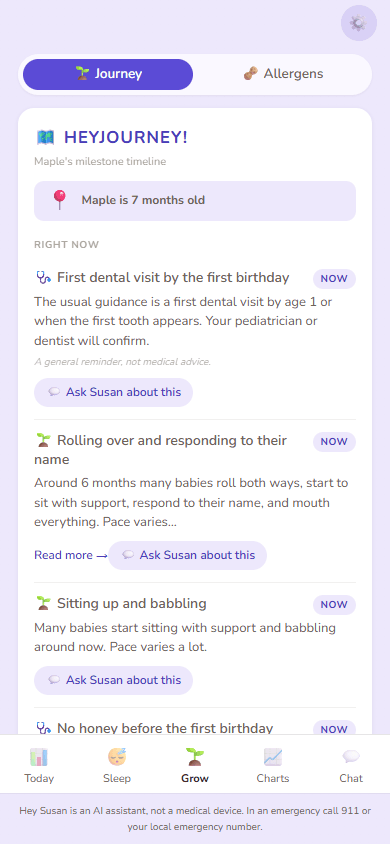
HeyJourney! timeline
See examples across the arc
Pregnancy
from a positive test- Book your first prenatal appointment
- Anatomy ultrasound window
- Get on daycare waitlists early
- Start planning leave and a baby budget
- Pack a hospital bag and install the car seat
+ 11 more in this phase
Newborn
0 to 3 months- Jaundice watch in the first days
- First pediatrician visit
- First social smiles
- Register the birth and apply for documents
- Two-month visit and first vaccines
+ 9 more in this phase
Infant
4 to 12 months- Six-month visit and starting solids
- Sitting up and babbling
- Nine-month visit and a development check
- No honey before the first birthday
- Pulling up, cruising, and first words
+ 7 more in this phase
Toddler
1 to 3 years- First steps and first real words
- Eighteen-month visit and screenings
- Two-year visit and autism screening
- Running and two-word phrases
- Yearly money check-in
+ 36 more in this phase
- checkups & health
- milestones
- appointments & registrations
- money & paperwork
- getting ready
These are general reminders to help you keep track, not medical advice. Timing and what is right for your baby is always a conversation for your pediatrician, OB, or midwife.
Checkpoint selection draws on public guidance from the AAP's Bright Futures schedule, the CDC's “Learn the Signs. Act Early.” milestones, and the Canadian Paediatric Society. Hey Susan is not affiliated with or endorsed by these organizations.
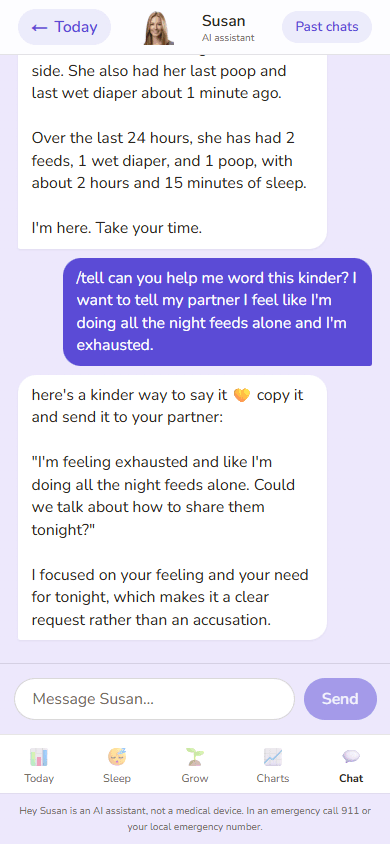
Draft a message
The wording
Max PerformanceHeyBeNice!
The plan
Plan board & Learning Paths
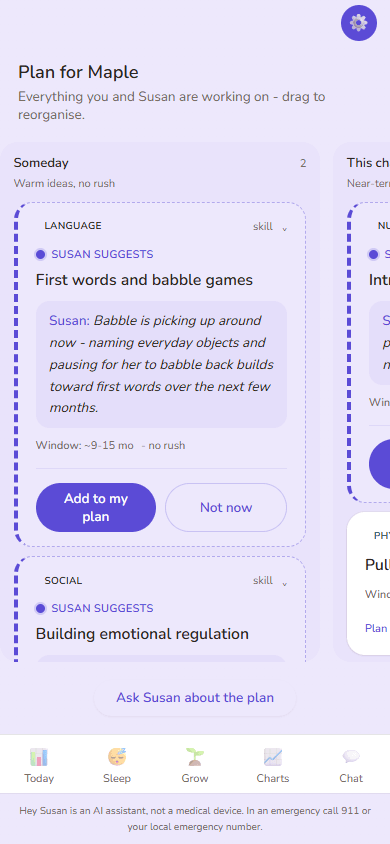
Plan board
Watch it in 11 seconds
The reminders
Max PerformanceHey PlanforMe!
A look inside — real conversations, real screens
This is the part other baby apps don't have: you just talk, and she knows your baby. Ask “how was her week?” and the real numbers come back.
Maya, here's the last week at a glance — tap 📊 Charts for the full picture.
From your own logs — the full picture lives on the Charts tab.
From your own logs — the full picture lives on the Charts tab.
From your own logs — the full picture lives on the Charts tab.
Ask for any stretch, in plain words
And when you'd rather tap than type — every screen is right there in the app, one tap away:
Today — what's coming up
Simple, honest pricing
Logging stays free. Keep the basics free forever, or add Susan — Max Performance.
Susan — Power Saver
$0forever
- Track feeds, diapers & sleep by text
- Basic manual tracking — log it, look it up
- A second caregiver included — one shared history, no asking twice
- The “worth a call” nudge when something looks off — safety is never behind a paywall
- HeyJourney! — the guided milestone timeline, birth toward 18
- Plan board & Learning Paths — yours to browse, add and drag
- Download your week as a calendar file, anytime
- Live dashboards and weekly charts
Susan — Max Performance
$99/yr · just $8.25/mo
or $14.99/mo billed monthly
USD, plus applicable taxes
Every new account gets a 14-day free trial of Max Performance, no card needed. If you haven't chosen a paid plan, nothing is charged when it ends and you stay on Power Saver. Paid plans renew automatically until you cancel, and if you subscribe during the trial your card isn't charged until it ends.
Everything in Susan — Power Saver, plus:
- Nap and feed windows from your baby's own logs. Estimates, not medical advice.
- Sharper memory. She finds the right detail from past chats, so you re-explain less.
- She can reach out first. Feed and sleep heads-ups, and a check-in on how you're doing.
- Naps and feeds on your Google Calendar. Only after you say yes, each time.
- HeyBeNice! Help finding softer words for your partner. Nothing goes out unless you confirm.
Hey Susan is an AI assistant, not a medical device, and not a substitute for your pediatrician, midwife, or emergency services. Website prices in USD; in the iOS and Android apps, the App Store or Google Play shows its own local price and any trial offer. Full subscription terms are in our Terms.
Privacy and safety
We don't sell your data. No ad trackers. Your conversations are private — your information is only ever used to run Susan for you, never sold, never shared with advertisers or data brokers.
Susan is powered by Google's Gemini model. Your data is processed under Google's terms — named on our privacy page. We don't use other LLM providers.
What Susan is — and isn't:
An AI assistant. Not a medical device. Not a substitute for your pediatrician, OB, midwife, or any licensed clinician. When something looks urgent, Susan says so clearly. Crisis routing (self-harm, emergency) is hard-coded — it bypasses the AI entirely. Susan shows you who to call; she doesn't place the call for you.
FAQ
- What does it cost?
- Logging and charts stay free. Every new account gets a 14-day free trial of Susan — Max Performance, with no card needed. If you haven't chosen a paid plan, nothing is charged when it ends and you stay on Susan — Power Saver. If you're expecting, the 14 days start when you tell Susan your baby has arrived, or 14 days after your due date if you haven't. Max Performance is $99/year or $14.99/month and renews automatically until you cancel; if you subscribe on our website during your trial, your card isn't charged until it ends. Website prices are in USD; in the iOS and Android apps, the App Store or Google Play shows its own local price and any trial offer.
- What if I want to cancel?
- Cancel anytime — no phone call, no retention flow, no hoops. Subscribed on our website: under Manage billing in your account. Subscribed in the iOS or Android app: in your Apple or Google Play subscription settings. Your logs stay either way.
- Is Susan a real person?
- No. Susan is an AI — trained to feel warm and consistent, but software. When something needs a real human (a doctor, a therapist, 911), she'll tell you.
- Is this medical advice?
- No. Susan notices patterns and tells you when to call your pediatrician. She does not diagnose.
- How does Susan remember things?
- Susan keeps the context of your recent conversations so you don't have to repeat yourself — your baby's name, how you're feeding, what you're worried about. Your data is yours: to have it deleted, email hi@heysusan.app and we'll remove it.
- Does Susan grow with my family?
- Yes. Susan starts at the newborn months and grows with you — through solids, sleep regressions, toddler tantrums, school transitions, eventually the teenage years. The newborn assistant is live now; the later stages roll out through 2026–2027.


